

It's Time To Power Productivity
Tired of slow Windows Explorer search? Try UltraSearch!
UltraSearch is the software of choice to enhance productivity for time-crunched project managers. It helps you find project files and data across multiple platforms using advanced filters for content and metadata. Stop missing out!
Show transcription
[On Screen: Animated file icons (PDF, Word, Excel, video, music, folders) float across the screen; the UltraSearch logo appears.]
Are you tired of searching for files on your computer all the time? Say hi to UltraSearch.
No matter if the files are on your own computer, company network, or SharePoint —
[On Screen: The UltraSearch Professional window with two fields, “Search by File Name” and “Search by Content”, and a “Search Location” panel offering Local Drive, SharePoint, and Network Storage.]
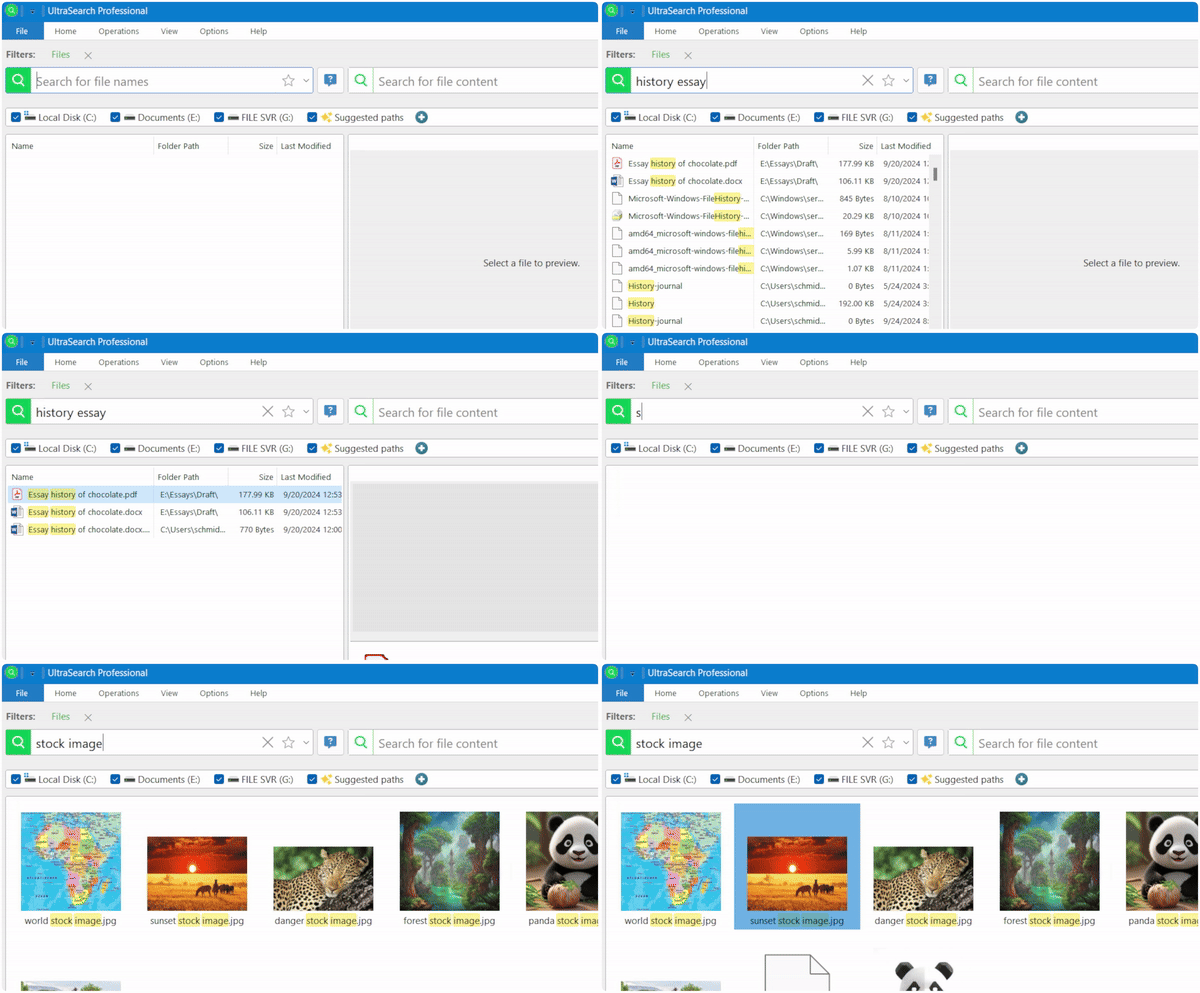
just type part of the file name or content, and UltraSearch will deliver results instantly.
Use filters to find office files, images, old or even bulky files.
[On Screen: A filter panel with Date, Size, and file-type options (PDF, Word, Excel, Videos, Music, Images); the results list narrows to the selected type.]
Don't remember the file name? No problem — just type part of the file content you remember.
[On Screen: A content search for “Sales for July” finds the file “Quarterly Revenue”; a click opens a quick document preview.]
Then click to have a quick preview.
Worried about high network load with multiple users? Don't worry — boost it with Data Central, which provides a central search index. It keeps the network load low and everyone happy.
[On Screen: A diagram shows several users connected to a central Data Central index node.]
[On Screen: Closing screen with the UltraSearch logo and a “Try for free” button.]
UltraSearch Is Trusted Around the World

What Makes UltraSearch The Best Productivity Software?

Find Project Data with Ease – Anywhere
Enterprise file shares can get chaotic. With UltraSearch, this is no longer your problem.
Search files by type, size, creation date and even content snippets. UltraSearch scans company servers, SharePoint, or your local hard drive – delivering results within seconds.

Refine Results With Advanced Filters
With UltraSearch's advanced filters, data never get lost in the abyss. Filter results for specific metadata to pinpoint exactly what you’re looking for.
Need that Excel project plan from five years ago? Or a PowerPoint created by Rob, your former colleague? Whatever you need, it’s just an UltraSearch away.

Simple to Use – Ready for You
Your workday is already complex enough - UltraSearch simplifies it.
With its clean and user-friendly interface, UltraSearch requires no technical skills to get started. UltraSearch suggests search destinations automatically and can access everything in your Windows Explorer.

Seamless Integration Into Your Workflow
UltraSearch fits into your workflow like the cup of coffee on your desk.
Looking for a document? Just double-tap CTRL to bring up UltraSearch and start searching. Preview file content and open up files from the results list. See how UltraSearch is the best productivity software for managers with time crunch.
Try For Free And Test For Yourself
More than 7.000 new users around the world decide for UltraSearch every month. Why not try it, too?
UltraSearch For Your Entire Team
Want to convince your sysadmins to roll out UltraSearch to your entire team? Tell them not to worry about network overload!
As an enterprise search solution, DataCentral is the perfect complement to UltraSearch. It creates a central search index that makes searches even faster, while reducing the strain on network resources. Your system administrators will love it!
Frequently Asked Questions
Do I need training to use UltraSearch?
No, you and your colleagues don't need any training at all. UltraSearch is designed to allow non-technical users to get up and running as quickly as possible.
We also provide helpful content such as tips and tricks around UltraSearch on our blog.
How does UltraSearch ensure data compliance?
When working with data, it is important that sensitive information does not fall into the wrong hands.
To ensure data compliance, UltraSearch can only access data that you already have access to via the Windows Explorer.
Will UltraSearch slow down my computer while running?
UltraSearch is designed to keep your system running as smoothly as possible while you search.
However, performing a content search on a large target without using filters may require additional resources.
To solve this, try refining your search with filters or think about upgrading UltraSearch with a central search index.
Can UltraSearch search SharePoint, too?
Yes, you can connect UltraSearch to your company’s SharePoint to search for files on it.
All you need is the URL to your company's SharePoint. Then you can login with your Windows account. Please ask your administrator to register UltraSearch in the Azure portal first.